
Home › Infographics › Pixels needed for every print size at 100 ppi
Pixels needed for every print size at 100 ppi
At 100 pixels per inch, a 4 x 6 inch print needs 400 x 600 pixels and a 48 x 60 inch print needs 4800 x 6000 pixels (28.8 megapixels). Pixels needed equal the size in inches times 100 on each side. ArtzFolio prints files at 100 ppi, so compare your photo with the size you want before you order.

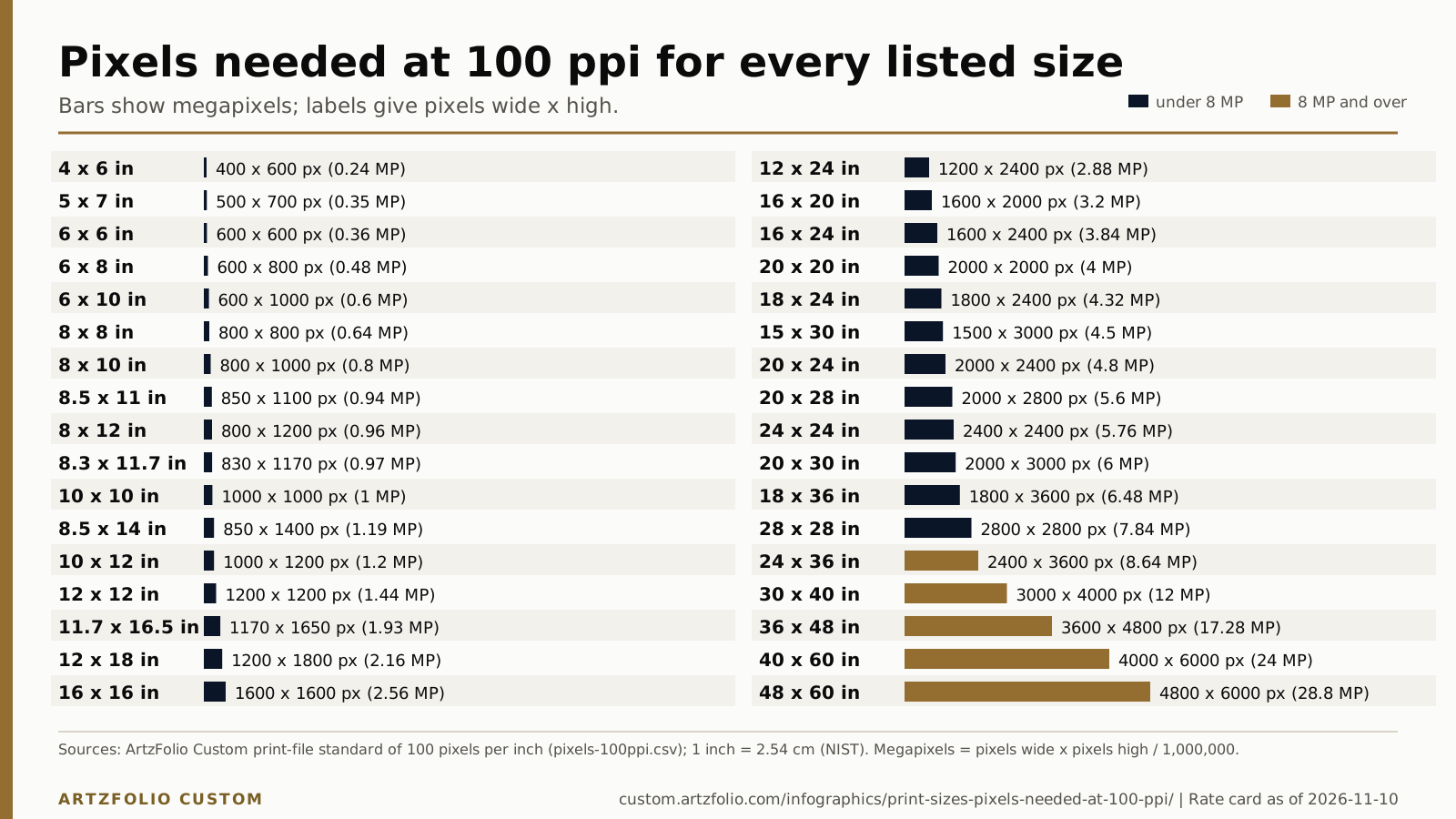
Text version of this infographic
The same data as the figure, as text, for screen readers, search and AI tools.
| Size (in) | Size (cm) | Pixels wide x high | Megapixels |
|---|---|---|---|
| 4 x 6 | 10.2 x 15.2 | 400 x 600 | 0.24 |
| 5 x 7 | 12.7 x 17.8 | 500 x 700 | 0.35 |
| 6 x 6 | 15.2 x 15.2 | 600 x 600 | 0.36 |
| 6 x 8 | 15.2 x 20.3 | 600 x 800 | 0.48 |
| 6 x 10 | 15.2 x 25.4 | 600 x 1000 | 0.6 |
| 8 x 8 | 20.3 x 20.3 | 800 x 800 | 0.64 |
| 8 x 10 | 20.3 x 25.4 | 800 x 1000 | 0.8 |
| 8 x 12 | 20.3 x 30.5 | 800 x 1200 | 0.96 |
| 8.3 x 11.7 | 21.1 x 29.7 | 830 x 1170 | 0.97 |
| 8.5 x 11 | 21.6 x 27.9 | 850 x 1100 | 0.94 |
| 8.5 x 14 | 21.6 x 35.6 | 850 x 1400 | 1.19 |
| 10 x 10 | 25.4 x 25.4 | 1000 x 1000 | 1 |
| 10 x 12 | 25.4 x 30.5 | 1000 x 1200 | 1.2 |
| 11.7 x 16.5 | 29.7 x 41.9 | 1170 x 1650 | 1.93 |
| 12 x 12 | 30.5 x 30.5 | 1200 x 1200 | 1.44 |
| 12 x 18 | 30.5 x 45.7 | 1200 x 1800 | 2.16 |
| 12 x 24 | 30.5 x 61 | 1200 x 2400 | 2.88 |
| 15 x 30 | 38.1 x 76.2 | 1500 x 3000 | 4.5 |
| 16 x 16 | 40.6 x 40.6 | 1600 x 1600 | 2.56 |
| 16 x 20 | 40.6 x 50.8 | 1600 x 2000 | 3.2 |
| 16 x 24 | 40.6 x 61 | 1600 x 2400 | 3.84 |
| 18 x 24 | 45.7 x 61 | 1800 x 2400 | 4.32 |
| 18 x 36 | 45.7 x 91.4 | 1800 x 3600 | 6.48 |
| 20 x 20 | 50.8 x 50.8 | 2000 x 2000 | 4 |
| 20 x 24 | 50.8 x 61 | 2000 x 2400 | 4.8 |
| 20 x 28 | 50.8 x 71.1 | 2000 x 2800 | 5.6 |
| 20 x 30 | 50.8 x 76.2 | 2000 x 3000 | 6 |
| 24 x 24 | 61 x 61 | 2400 x 2400 | 5.76 |
| 24 x 36 | 61 x 91.4 | 2400 x 3600 | 8.64 |
| 28 x 28 | 71.1 x 71.1 | 2800 x 2800 | 7.84 |
| 30 x 40 | 76.2 x 101.6 | 3000 x 4000 | 12 |
| 36 x 48 | 91.4 x 121.9 | 3600 x 4800 | 17.28 |
| 40 x 60 | 101.6 x 152.4 | 4000 x 6000 | 24 |
| 48 x 60 | 121.9 x 152.4 | 4800 x 6000 | 28.8 |
Data for this infographic: CSV and JSON.
How to use this infographic
- Find your print size on the left or right column and read the pixels wide x high.
- Open your photo details and compare its width and height in pixels.
- If both are at least the pixels shown, the file meets 100 ppi at that size; if not, pick a smaller size.
Questions
How many pixels does a 24 x 36 inch print need?
At 100 pixels per inch it needs 2400 x 3600 pixels, which is 8.64 megapixels.
What is the smallest listed size and what does it need?
The smallest listed size is 4 x 6 inches, which needs 400 x 600 pixels (0.24 megapixels) at 100 pixels per inch.
What is the largest listed size and what does it need?
The largest listed size is 48 x 60 inches, which needs 4800 x 6000 pixels (28.8 megapixels) at 100 pixels per inch.
Sources
- ArtzFolio Custom: pixels needed at 100 ppi, data file (page as of 2026-11-10)
- NIST: SI units, length (1 inch = 2.54 cm exactly) (fetched 2026-11-12)
Rate card as of 2026-11-10. Figures are paraphrased or computed from the sources above; the figure carries its own source line. Confirm live prices and terms with ArtzFolio Custom before you order.